Real-time SAP data for IBM watsonx.
AI agents and analytics are only as good as the business data they can reach. The ASAPIO Integration Add-on publishes events from SAP ECC and SAP S/4HANA to IBM Event Streams the moment they happen, so IBM watsonx.data and watsonx.ai work with current SAP data. Code-less, bidirectional, and running as ABAP inside your SAP system, with no extra middleware to operate.
Live SAP events for your agents
Order creations, stock movements and financial postings are published to IBM Event Streams topics when they occur in SAP. ASAPIO supports RAP events, BOR events, BTEs, Change Documents and IDocs as triggers – no polling and no custom ABAP for standard objects.
Bidirectional
Outbound from SAP to IBM Event Streams, and inbound back into SAP via IDoc, BAPI or custom-code handlers, so results from downstream systems can flow into SAP processes.
Code-less payload design
Use the ASAPIO Payload Designer to define message payloads from SAP tables, CDS views or IDocs – without writing ABAP. The same configuration approach applies across all ASAPIO connectors.
Batch mode & multi-threading
For initial data loads and large extractions, ASAPIO supports job-driven batch mode with multi-threading across SAP work processes. Batch and event-driven modes can run side by side.
Reliable delivery
Outbound messages are queued within SAP via bgRFC and retried automatically with configurable retry logic. Failed deliveries can be handled with the ASAPIO Dead Letter Queue pattern.
SAP ECC and SAP S/4HANA
Works on SAP ECC 6.0 EhP 6 or higher, SAP S/4HANA On-Premise and Private Cloud Edition and other SAP NetWeaver ABAP systems as per Minimum Requirements.
From SAP business event to watsonx
ASAPIO runs as native ABAP code inside your SAP system. A business event in SAP triggers an interface, the payload is built from SAP tables, CDS views or IDocs, and the message is published to a topic in IBM Event Streams via the native Kafka protocol. There is no separate middleware server and no agent to operate.
IBM Event Streams, IBM's event streaming platform based on Apache Kafka, decouples SAP from its consumers. It runs as a managed service on IBM Cloud or on premises as part of IBM Event Automation or IBM Cloud Pak for Integration. IBM watsonx offers interfaces to Kafka, so watsonx.data and watsonx.ai can work with the same SAP events that other applications use, and a single configuration in SAP serves them all. The Kafka connector page describes the technical details.
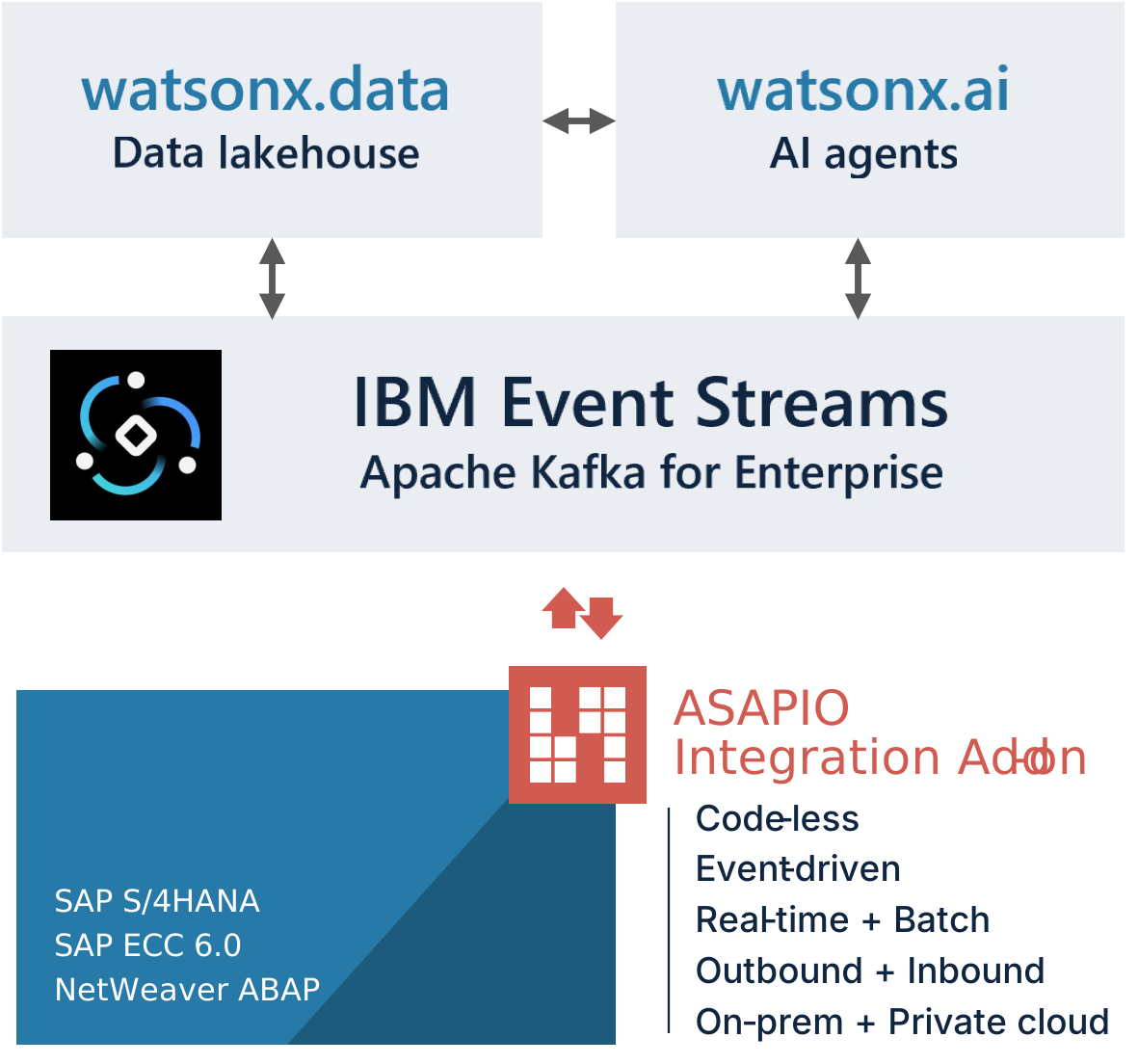
Four steps from SAP event to watsonx
The SAP side is configured, not coded. No custom development and no new infrastructure to run.
Get startedDeploy the ASAPIO Integration Add-on into your SAP ECC or SAP S/4HANA system with the standard SAP Transport Management System.
Point ASAPIO to the bootstrap server of your IBM Event Streams instance and configure authentication in the ASAPIO configuration screen; credentials are kept in the SAP Secure Store. Test the connection with a single click.
Use the visual Payload Designer to map SAP business objects to message fields, then attach the interface to a BOR event, Business Transaction Event or Change Document trigger. No ABAP required.
Connect watsonx.data and your watsonx.ai agents to the IBM Event Streams topic. Activate the ASAPIO interface with a toggle and monitor the message flow in the ASAPIO Event Studio.
Common questions
Can't find the answer here? Contact our team directly.