SAP data into Microsoft Fabric – in real time.
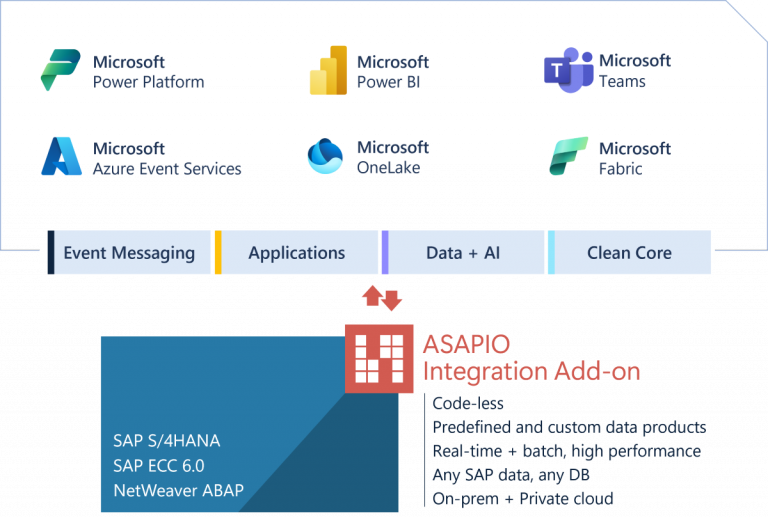
The ASAPIO Integration Add-on connects SAP ECC and SAP S/4HANA directly to Microsoft Fabric and OneLake via Open Mirroring & Parquet. Real-time changes and mass transfers from a single SAP-native add-on.

Accelerate your data potential with Microsoft Fabric, Power BI and more
From data integration to business intelligence and real-time analytics – Microsoft Fabric enables companies to manage their analytics workloads in a SaaS-based, lake-first solution. With ASAPIO, you can model your custom SAP data objects for direct integration to OneLake.
Open Mirroring
Continuously replicate SAP data into a Fabric Mirrored Database in Parquet format. No complex pipelines – changes land directly in Fabric for native analytics with minimal latency.
OneLake & Lakehouse
Feed data directly into OneLake – Microsoft Fabric’s unified storage layer. For Lakehouse scenarios, upload structured files to any OneLake path with full control over target directory, file name and format.
Batch & delta loads
Run full initial loads via Packed Load for historical data and switch automatically to delta updates. Multi-threading and paging keep throughput high even for large data volumes.
Predefined data catalog
30+ ready-to-deploy payload designs for the most common SAP data objects – Sales Orders, Purchase Orders, GL Accounting, Delivery Documents, Material Movements, Customer master, Equipment and more – for both ECC and SAP S/4HANA.
View CatalogLow-code payload design
Use the ASAPIO Payload Designer to model any SAP table or CDS view for Fabric – with field renaming, value mapping, filter conditions and BAdI extensibility. No ABAP development required for standard data products.
Power BI & Fabric analytics
SAP data in OneLake is instantly available to all Fabric workloads – Power BI semantic models, notebooks, Spark pipelines and real-time dashboards. One integrated analytics platform, fed live from your SAP systems.
 SAPonAzure Podcast
ASAPIO as guest on Microsoft's SAPonAzure Podcast
Jakob Vogelsang walks through how ASAPIO bridges SAP and the Microsoft cloud – covering event-driven architecture, Open Mirroring, Fabric analytics and real-world integration patterns. Hosted by the Microsoft SAP on Azure team.
- SAP event-driven architecture explained end-to-end
- Open Mirroring and OneLake integration in practice
- No-middleware SAP-to-Azure patterns for enterprise teams
What's new in the ASAPIO Fabric Connector
Real-time data replication from SAP into a Fabric Mirrored Database – no ETL pipelines, no complex orchestration. Data lands in Parquet format and is immediately queryable by Power BI, Spark and other Fabric workloads.
Richer set of predefined payload designs for SAP ECC and SAP S/4HANA – covering more business objects out of the box, reducing time-to-value for new Fabric integrations.
From SAP events to Fabric analytics – without ETL pipelines
Traditional SAP-to-analytics architectures require staging databases and complex pipelines. ASAPIO's Fabric Connector eliminates the middle layer: SAP delta changes land directly in your Fabric Lakehouse or Mirrored Database as they occur, in Parquet format. Your Power BI reports reflect SAP reality within seconds to minutes, not hours.
- Delta and full initial load from the same connector
- Parquet format via Open Mirroring for native Fabric analytics
- 30+ pre-built SAP object mappings in the data catalog
- Compatible with SAP S/4HANA, ECC, BW or any NetWeaver ABAP system
Five steps to stream SAP data into Fabric
From installation to real-time analytics in your Lakehouse or Mirror – all without custom code.
Install ASAPIO Integration Add-on
Import the ASAPIO Integration Add-on via standard SAP transport import. No custom ABAP development required – works with SAP ECC 6.0, SAP S/4HANA and any NetWeaver ABAP system meeting the minimum requirements.
Configure Microsoft Fabric endpoint
Provide your Fabric Lakehouse or Mirror URL and set up authentication credentials. ASAPIO creates a secure connection to your Fabric environment in OneLake.
Select SAP objects from the catalog
Choose from 30+ pre-built SAP object mappings (Sales Orders, Purchase Orders, GL Accounting, Materials, Customers, etc.) or model custom ones in the Payload Designer – no ABAP required.
Choose delivery mode
Use Open Mirroring for continuous delta replication into a Mirrored Database, OneLake file upload for scheduled bulk transfers, or combined mode for initial load followed by delta updates. Each interface is configured independently and can run in parallel.
Activate and monitor
Turn on the interface and watch data flow from SAP into Fabric. Monitor message counts, latency and errors from the ASAPIO cockpit or the Fabric Monitoring Hub.
Predefined SAP data products – ready to deploy
The Add-on ships with 30+ code-free payload designs covering the most common SAP business objects for both ECC and SAP S/4HANA. Activate, configure and stream – no ABAP development required.
- Sales Order & Sales Order Items
- Purchase Order & Purchase Order Items
- Production Order
- Accounting Data
- Delivery & Delivery Item
- Supplier Invoice
- Goods Movement
- Billing Document Item
- Customer
- Contract
- Equipment
- Plant
- Product & Product Group
Works with all major SAP deployments
- SAP ECC 6.0 EhP 6 or higher (AnyDB and HANA)
- SAP S/4HANA On-Premise
- SAP S/4HANA Private Cloud Edition (PCE)
- RISE with SAP, Private Cloud Edition
- Any SAP NetWeaver ABAP system
The Fabric Connector is bundled with the ASAPIO Azure Connector package, which also supports:
- Azure Event Hub
- Azure Event Grid
- Azure Service Bus
- Power Platform (via Azure event services)
- Microsoft Fabric (OneLake, Lakehouse, Mirror)
See ASAPIO Fabric Connector in action

Demo: SAP ECC to Fabric
Watch how sales orders are streamed from SAP ECC directly into a Microsoft Fabric Lakehouse – without ETL or custom code.

Webinar recording
Full webinar session from June 2024 – Fabric integration deep-dive, live Q&A and architecture walkthrough.
SAPonAzure Podcast – Ep. 293
ASAPIO on the Microsoft SAPonAzure Podcast – discussing SAP integration to Microsoft Fabric in episode 293.
Common questions
Can't find the answer here? Contact our team directly.